
How to Use the Online Mic Test
Esta guía le mostrará cómo utilizar la herramienta de prueba de micrófono en línea para comprobar si su micrófono funciona correctamente.
Paso 1: Permitir el acceso al micrófono
- Visite el sitio web de prueba de micrófonos en línea.
- Cuando tu navegador te lo solicite, haz clic en "Permitir" para otorgarle al sitio web acceso a tu micrófono. Normalmente, aparece una ventana emergente cerca de la barra de direcciones en la parte superior de la pantalla (en PC) o requiere desplazarse hacia arriba (en dispositivos móviles).
- Si tu navegador bloquea las ventanas emergentes, es posible que no veas la solicitud para otorgar acceso a tus altavoces o micrófono.
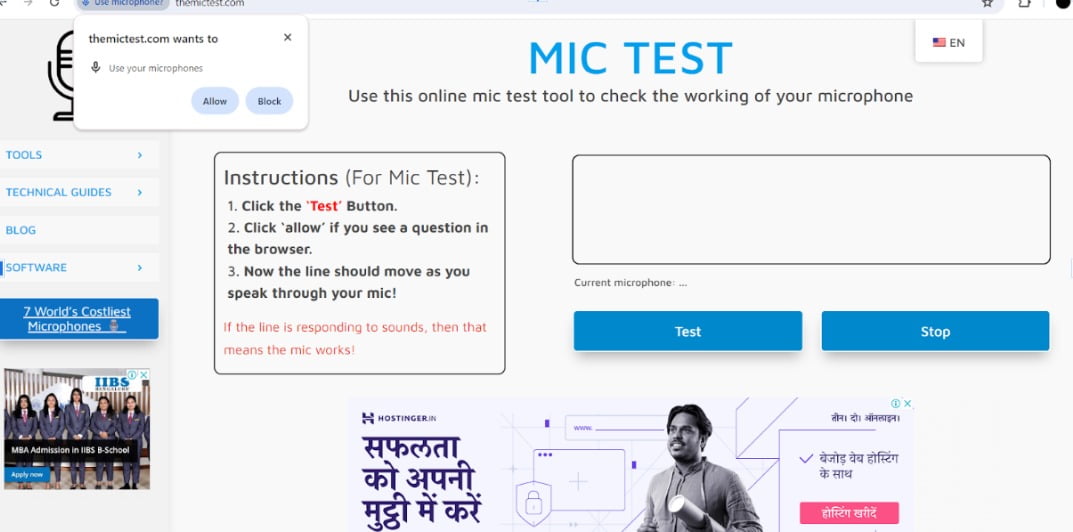
Step 2: Test Your Microphone
- Click the button labeled “Test” or “Start test”

Step 3: Speak into the Microphone
- Say a few words or make some noise into your microphone.

Step 4: Observe the Results
- If your microphone is working correctly, you should see a line moving up and down in the test area as you speak.
Step 5: Stop the Test (Optional)
- You can now press the “Stop” button to end the test manually. Otherwise, simply stop speaking into the microphone.
Consejos:
- If you don’t see the line moving, try speaking louder or refreshing the page.
- Make sure your microphone is not muted and the volume is turned up in your device settings.
- If you’re still having trouble, consult the website’s troubleshooting guide for further assistance.
- Si sigues teniendo problemas, themictest tiene una guía de solución de problemas en su sitio web para brindarte más ayuda.
 ES
ES  EN
EN  DE
DE  FR
FR  JA
JA  KO
KO  VI
VI  HI
HI  RU
RU  ZH
ZH  PL
PL  ID
ID