
Cách sử dụng Kiểm tra Mic trực tuyến với Phát lại
This guide will show you how to use the online mic test tool to check if your microphone is working properly.
Step 1: Allow Microphone Access
- Visit the online mic test website.
- When prompted by your browser, click “Allow” to grant the website access to your microphone. This is usually a pop-up near the address bar at the top of your screen (on PC) or requires scrolling up (on mobile).
- Nếu trình duyệt của bạn chặn cửa sổ bật lên, bạn có thể sẽ không thấy lời nhắc cấp quyền truy cập vào loa hoặc micro.
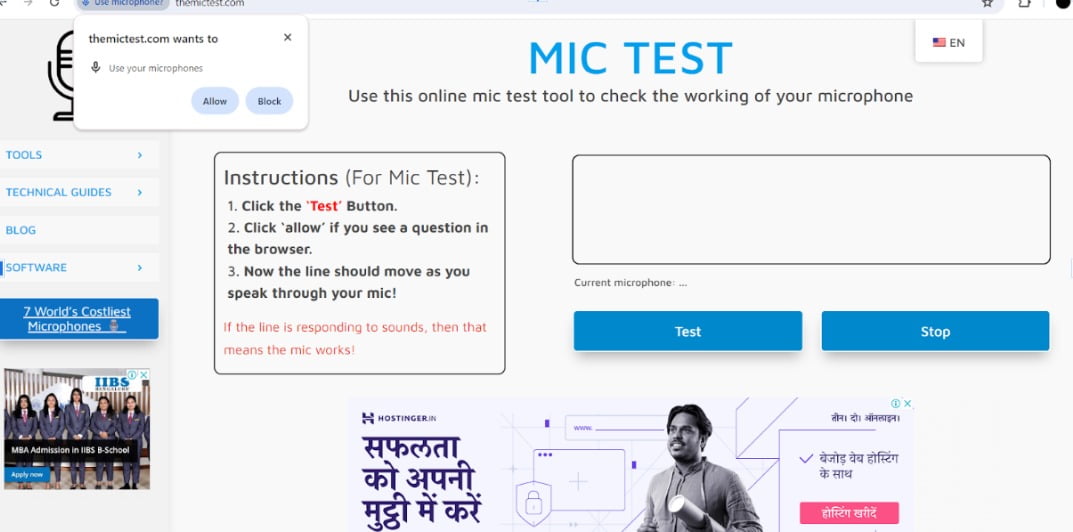
Step 2: Test Your Microphone
- Click the button labeled “Test” or “Start test”.

Step 3: Speak into the Microphone
- Say a few words or make some noise into your microphone.

Step 4: Observe the Results
- If your microphone is working correctly, you should see a line moving up and down in the test area as you speak.
Mẹo:
- If you don’t see the line moving, try speaking louder or refreshing the page.
- Make sure your microphone is not muted and the volume is turned up in your device settings.
- If you’re still having trouble, consult the website’s troubleshooting guide for further assistance.
- Nếu bạn vẫn gặp sự cố, themictest có hướng dẫn khắc phục sự cố trên trang web của họ để được hỗ trợ thêm.
 VI
VI  EN
EN  DE
DE  ES
ES  FR
FR  JA
JA  KO
KO  HI
HI  RU
RU  ZH
ZH  PL
PL  ID
ID